
JingZhi Camera JingZhi Camera

How to Choose a Device That Finds Hidden Cameras?

Time:2026-10-17 Author:Amelia
0%

Choosing a Device That Finds Hidden Cameras requires more than buying the most expensive gadget online. A reliable choice depends on where you will use it, what signals it can detect, and how clearly it explains results. A hotel room, rental apartment, and changing area may present different challenges. Some devices scan radio-frequency transmissions. Others use infrared light or lens reflection to reveal a camera’s optical surface. No single method works perfectly.

Look for clear specifications, independent testing, and practical operating instructions. A trustworthy detector should explain its detection range, supported frequencies, battery performance, and known limitations. It should also reduce false alarms from Wi-Fi routers, phones, televisions, and Bluetooth devices. Small details matter. Can you read the display in a dim room? Does the alert become confusing near a crowded network? These questions are easy to overlook.

Use the device lawfully and respectfully. Inspect only spaces where you have permission, and contact property management or local authorities if you find something suspicious. Do not touch, disable, or remove an unfamiliar device. Document its location from a safe distance instead. User reviews can help, but they are not proof of accuracy. Even professional tools may miss wired, inactive, or well-concealed cameras. That limitation deserves honesty. The best Device That Finds Hidden Cameras supports careful observation; it does not replace it. A calm, repeatable inspection is often more valuable than dramatic marketing claims. Test before travel. Keep expectations realistic.
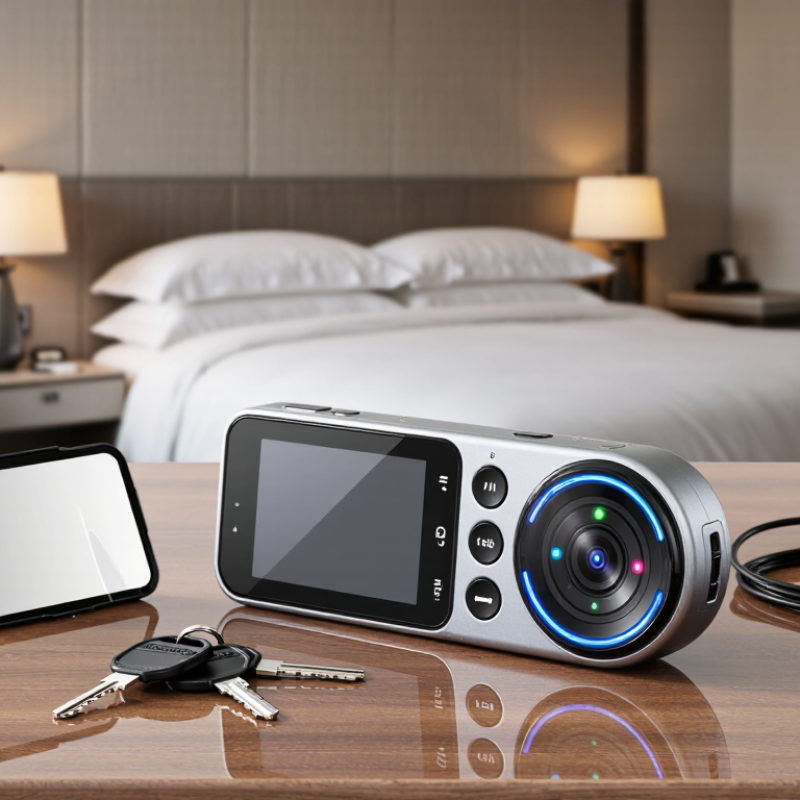
How to Choose a Device That Finds Hidden Cameras?

What Hidden Camera Detection Devices Are and How They Work

Hidden camera detection devices are tools that help identify cameras by sensing their signals or reflecting light from their lenses. They do not detect every camera automatically. Their performance depends on distance, camera design, walls, and surrounding electronics.

A common device uses radio-frequency detection. It scans for wireless signals sent by cameras, transmitters, phones, or routers. A stronger signal may trigger lights, sounds, or a rising meter reading. However, a signal does not prove that a camera is present.

Optical lens finders use small LEDs to create reflections from camera lenses. In a dim room, a lens may appear as a sharp, bright point. Move slowly. Check smoke detectors, clocks, vents, and unusual holes from different angles. Some devices also scan local networks, but they may miss cameras using separate connections or stored recording.

Choose a detector with adjustable sensitivity, clear indicators, stable calibration, and practical battery life. Detailed instructions matter more than extra features. Security professionals often recommend combining RF checks with a careful visual inspection. Test the device in a known setting before relying on it. A quiet reading can still be misleading. Wired cameras may produce no radio signal, while metal surfaces can create confusing reflections. I would treat the device as a screening tool, not absolute proof. If something remains suspicious, record the location and seek qualified assistance.

Which Detection Technology Fits Your Inspection Needs

Choosing a hidden-camera detector starts with the inspection environment, not the device’s advertised range. Radio-frequency scanners suit rooms with transmitting devices. They detect bursts from wireless links, but quiet or wired cameras may remain invisible. The 2024 Verizon Data Breach Investigations Report found that the human element appeared in 68% of breaches. That figure supports disciplined inspections, not blind trust in technology. Check power adapters, smoke detectors, vents, clocks, and unusual wall openings.

Optical detection helps locate reflective lenses. A narrow beam can reveal a sharp glint across a dark room. It works without wireless transmission. However, glass, mirrors, and polished screws can create false alerts. Network inspection is useful on managed Wi-Fi systems. NIST SP 800-115 recommends structured technical testing, evidence recording, and verification. Thermal tools can expose heat from active electronics, but sunlight and warm appliances complicate readings. Magnetic sensing has limited value because many modern devices contain little detectable metal.

I prefer combining two methods, then checking suspicious objects physically. No detector is magic. During field inspections, I have seen promising readings disappear after changing the viewing angle. That was user error, not a device failure. Select equipment with adjustable sensitivity, clear indicators, rechargeable power, and documented test procedures. Independent laboratory testing matters more than dramatic range claims. Oversight is easy to skip. It should not be.

How to Choose a Device That Finds Hidden Cameras?

Which Detection Technology Fits Your Inspection Needs?

Radio-frequency scanners are useful when a camera is transmitting wirelessly, especially across common 433 MHz, 868 MHz, 915 MHz, 2.4 GHz, and 5 GHz bands. Optical lens finders work by revealing reflected light from a camera lens, while thermal cameras identify heat patterns and are useful when a device is powered but not actively transmitting. For the most reliable inspection, combine RF scanning with optical and physical checks.

How to Compare Detection Range, Accuracy, and False Alarms

Choosing a hidden-camera detector requires more than trusting its maximum range. In real rooms, walls, mirrors, metal fixtures, and Wi-Fi congestion can reduce performance sharply. A device rated for 10 meters may detect a strong transmitter across a room, yet miss a weak signal two meters away. Ask for test conditions, not just the headline number. NIST Technical Note 1297 stresses that measurement uncertainty must accompany technical results.

Accuracy also needs careful interpretation. Optical lens detection can reveal a reflection from a camera lens, while radio-frequency scanning searches for active wireless transmissions. These methods measure different risks. ISO 5725 separates repeatability from reproducibility, which helps when comparing laboratory results with field experience. Look for independent testing under several lighting levels and room layouts. A dark room is not enough.

False alarms often decide whether a detector remains useful. Bluetooth devices, routers, smart speakers, and nearby phones may trigger radio alerts. The 2024 Data Breach Investigations Report found that human involvement appeared in 68% of analyzed breaches, showing why practical privacy checks still matter. However, a sensitive detector can become exhausting if it alerts every few seconds. Test it in a quiet room, then near ordinary wireless equipment. Record missed detections and unnecessary alerts. My own caution is simple: advertised accuracy rarely explains what the device failed to find.

How to Evaluate Portability, Privacy, and Ease of Use

A hidden-camera detector should travel easily, not become another device to manage. Look for a pocket-sized model with a firm grip, a clear display, and physical controls. A weight below 300 grams feels practical during a room-by-room inspection. Battery life matters too. Eight hours is useful for travel, but real performance may drop with constant scanning. I once underestimated glare on a glossy screen. That small flaw slowed the inspection.

Privacy deserves equal attention. Cisco’s 2024 Consumer Privacy Survey reports that 75% of consumers will not buy from organizations they do not trust with personal data. Choose a detector that works locally, without mandatory accounts or cloud uploads. Check its app permissions carefully. A device requesting contacts or microphone access seems excessive. Review whether scan histories, room images, or location data are stored. Verizon’s 2024 Data Breach Investigations Report found that the human element appeared in 68% of breaches, so careless settings can create avoidable exposure.

Ease of use is more than a simple interface. The detector should explain signal strength, lens reflections, and false alarms in plain language. Test it with ordinary objects, such as a mirror, router, or television remote. Clear instructions matter under stress. IBM’s 2024 Cost of a Data Breach Report placed the global average breach cost at 4.88 million dollars. That figure does not prove every detector prevents a breach, but it supports careful privacy choices. Some “automatic” modes still need judgment. That is where many buyers may be disappointed.

How to Test and Use a Hidden Camera Detector Safely

A hidden camera detector is only useful when tested carefully. Begin in a controlled room with no unknown devices. Read its sensitivity settings, charging limits, and detection range. Test the unit against a known wireless transmitter and a small camera lens. It should respond consistently, not merely flash near every reflective surface. Turn off your own Wi-Fi, Bluetooth, and smart speakers before scanning. Otherwise, your detector may identify your equipment instead. NIST SP 800-115 recommends controlled, documented security testing, and that principle applies here.

Use slow passes around smoke detectors, power adapters, clocks, vents, mirrors, and unusual wall openings. Hold the lens-finding light at eye level and change your viewing angle. A bright pinpoint reflection is only a clue. Dust, glass, and polished screws can create false alarms. Radio-frequency detection also has limits; a camera that stores footage locally may remain silent. That limitation is easy to forget.

Verizon’s 2024 Data Breach Investigations Report examined 30,458 incidents and 10,626 confirmed breaches. It found a human element in 68% of breaches. Careless handling matters. Do not dismantle unfamiliar equipment or touch exposed wiring. Record the time, room, detector setting, and exact location with neutral photographs. A second person should repeat the scan independently. My own judgment can drift after a long search. If a finding still seems credible, leave the area and contact the property manager or appropriate local authority. Avoid public accusations before the device is professionally verified.

How to Choose a Device That Finds Hidden Cameras? - How to Test and Use a Hidden Camera Detector Safely

The table compares common hidden-camera detection approaches. Actual performance depends on the camera design, distance, lighting, materials, radio activity, and the detector’s quality. No single method can reliably find every hidden camera.

Detection Method What It Can Detect Best Conditions Main Limitations Safe Testing Procedure Practical Rating
Visual inspection Visible lenses, unusual openings, misplaced objects, loose wiring, and suspicious power sources. Well-lit rooms, uncluttered spaces, and a slow inspection from different angles. A small or well-concealed camera may be difficult to see; appearance alone cannot confirm whether an object is a camera. Check objects without opening electrical fixtures or dismantling property. Photograph anything suspicious before touching it. Essential first step
Lens-reflection finder Possible camera lenses by directing a bright, controlled light toward reflective surfaces. Dim rooms, a steady viewing angle, and a clear line of sight to the suspected object. Glass, polished metal, dust, and other reflective surfaces can create false positives. A non-reflective lens may be missed. Use a low-power light source; do not shine intense light into people’s eyes or traffic areas. Confirm findings visually. Useful secondary check
Radio-frequency scanning Radio transmissions from some wireless cameras, microphones, phones, routers, and other electronic devices. A quiet radio environment with nearby known transmitters identified and temporarily minimized. Wired cameras, recording-only cameras, inactive devices, and devices using uncommon or intermittent signals may not be detected. False alarms are common. Test the detector near a known permitted signal source first. Move slowly and compare readings rather than relying on one peak. Helpful but incomplete
Infrared-light check Some infrared illuminators used for night vision, when the illuminator is active and visible to the detector or camera. Darkened rooms and a device capable of showing near-infrared light. Not all cameras use infrared illumination. Sunlight, remote controls, and other infrared sources can produce misleading results. Use the detector’s instructions and avoid staring into unknown bright sources. Do not dismantle or modify the suspected device. Situational
Network-device review Connected devices visible on a local network, such as cameras or streaming devices that identify themselves. A network you own or are explicitly authorized to inspect, with access to the router or network-management interface. It cannot reveal devices on another network, cellular connections, separate networks, or offline recording systems. Use only authorized network tools. Do not attempt to access, interrupt, or change another person’s network. Good when authorized
Acoustic or magnetic checks In limited cases, unusual electronic noise or magnetic fields from powered equipment. Controlled environments with a suitable, calibrated instrument and a known reference reading. These signals are not unique to cameras and can come from ordinary wiring, appliances, speakers, or power supplies. Treat readings only as clues. Never use them as a reason to open walls, sockets, ceiling fixtures, or other hazardous equipment. Low confidence alone

Selection Checklist

Selection Factor What to Look For Why It Matters
Detection coverage A combination of visual, lens-reflection, and radio-frequency functions rather than a single detection mode. Different cameras may be wired, wireless, inactive, or designed without infrared illumination.
Adjustable sensitivity Sensitivity controls, signal-strength indicators, and an audible or visual alert that can be adjusted. Adjustments help separate nearby ordinary transmitters from stronger or more unusual signals.
Clear instructions A manual explaining operating modes, limitations, charging, calibration, and interpretation of alerts. A detector cannot be evaluated safely or accurately without understanding its operating limits.
Power and portability A charged battery, clear battery-status display, compact housing, and controls that are easy to use while walking slowly. A low battery or difficult interface can produce unreliable results or cause missed areas.
Evidence handling The ability to record observations manually, with time, location, photos, and detector readings. Documented observations are more useful than an isolated alarm and help professionals assess the situation.
Safety note: Do not touch, disable, remove, or dismantle a suspected device if doing so could create an electrical, fire, privacy, or legal risk. Leave the area if you feel unsafe, preserve the scene, and contact the property manager, local authorities, or a qualified security professional as appropriate.

FAQS

What is a hidden camera detection device?

It is a screening tool that senses wireless signals or lens reflections. It cannot find every camera.

How does radio-frequency detection work?

It scans for wireless signals from cameras, phones, routers, or transmitters. A signal alone does not prove a camera exists.

How do optical lens finders work?

Small LEDs shine toward possible lenses. In a dim room, a lens may appear as a sharp, bright point.

Where should I scan?

Move slowly around smoke detectors, clocks, vents, mirrors, adapters, and unusual wall openings. Check from different angles.

Can a detector miss a camera?

Yes. Wired cameras or local-storage cameras may produce no radio signal. Walls and metal surfaces can also interfere.

How should I test a detector before using it?

Test it in a controlled room with a known wireless transmitter and camera lens. It should respond consistently.

How can I reduce false alarms?

Turn off your Wi-Fi, Bluetooth, and smart speakers. Dust, glass, and polished screws can reflect light.

What should I do after finding something suspicious?

Record the room, time, detector setting, and exact location. Do not dismantle unfamiliar equipment or touch exposed wiring.

Should I trust one scan?

No. Ask a second person to repeat the scan independently. My judgment can drift after a long search.

When should I seek assistance?

Leave the area if the finding remains credible. Contact the property manager or an appropriate local authority. Avoid public accusations.

Conclusion

Choosing a Device That Finds Hidden Cameras begins with understanding how different detectors work. Some identify reflective lens surfaces, while others scan for radio signals or unusual electronic activity. The best option depends on your inspection needs, including the type of space, expected camera placement, and whether you need a quick visual check or a more thorough examination. Compare detection range, accuracy, sensitivity controls, and the likelihood of false alarms caused by ordinary electronics.

A practical detector should also be portable, discreet, easy to operate, and designed with privacy in mind. Clear instructions, reliable indicators, and a long-lasting battery can make inspections more convenient. Before use, read the manual, check the device in a controlled environment, and avoid interfering with unfamiliar equipment. Scan methodically from multiple angles, verify alerts rather than assuming every signal indicates a camera, and respect property boundaries and personal privacy throughout the process.

Amelia

Amelia

Amelia is a seasoned marketing professional with a wealth of expertise in our company’s core offerings. With an unwavering passion for driving growth and innovation, she plays a pivotal role in shaping our marketing strategies and enhancing brand visibility. A key aspect of her responsibilities......